XML and Localis/zation
Prepared for LIS419 XML Class by Peishan T. Bartley. Last updated 4/26/06.
1. Language and XML
One of the advantages of using XML is that it supports various encodings. As long as the encoding is declared, styled correctly (for example: displaying the text from left to right or from right to left), and supported by browsers, a programmer can use any language within the XML file. [Example: http://mikeandpeishan.com/psSchool/LIS531F/assign4_libInfo0_zn2.xml. ] [Chinese XML Now! http://xml.ascc.net/. Tests: http://xml.ascc.net/test/en/utf-8/index.html.] And as long as there is a parser for a specific language, the tags can be expressed in that language as well. This makes XML extremely flexible, and makes it a good candidate as a localization tool.
2. Localization. What is it and why is it necessary?
Internationalization is to develop software so it can run in different international environments without adapting or recompiling. W3C has a group dedicated to software internationalization: http://www.w3.org/International/.
Localization, defined as “to make local: orient locally” on Merriam-Webster abridged dictionary, is an act of transforming the product presentation for local users by translating it into the local language, and formatting the text by the local syntax preferences. The localized document is not only expressed in the locally preferred language, but is also complied with local costume and culture.
This is important because localization customizes existing products for different regions or languages to maximize the research and development’s return on the investment (of big software companies). It started to gain importance during the 1980’s when personal computers became popular. It is now ever important; what with 70% of Web users’ primary languages are not English. Even within the US, 18% of the population speaks a non-English language at home. A program needs to account for these different languages, formats, and syntaxes to really reach these users.
But localization is not just translation. Formats and language syntax also play important roles. Take dates for example, some places follow the dd/mm/yy while we use the mm/dd/yy format. Another example is addresses (see http://mikeandpeishan.com/psSchool/LIS531F/assign4_libInfo0_zn2.xml and http://mikeandpeishan.com/psSchool/LIS531F/assign4_libInfo0.xml). There may also be cultural stimulus or taboos on interface design; color or image usages. There is also the issue of text length. When a sentence or a paragraph was translated into a second language, it may be of different length, and that may affect the layout (such as the use of text wrap, scroll bar, etc.).
For XML, localization can be successfully handled by XSL or DTD. Using the attributes such as language, different XSL can be used to transform documents for different locale or regions. An example is seen here: http://mikeandpeishan.com/psSchool/LIS531F/assign4_libInfo0_zn.xml and http://mikeandpeishan.com/psSchool/LIS531F/assign4_libInfo0.xml. As these two pages demonstrate, the same XML file can be rendered to display in different languages and in different colors.
DTD can be used to prepare a file for translation and help the translators during the translation process. Ishida (2002) published an article discussing how to design a localization-friendly DTD. The main idea is to declare elements and attributes that would help facilitate the translation process. The practices Ishida suggests include:
a.) Make good use of the <language> attribute; use it to define the language the segment should be translated into.
b.)
Provide an HTML <span> like element that
would allow the developer to allocate attributes or assign notes to a parts of
a text. For example:
<intro>This is an introduction paragraph in which <span language=”en”
translate=”no”> this part should not be translated.</span>
</intro>
c.) Assign unique and persistent ID to each element to enable future translation reusing. The ID will allow the translation tool to automatically and correctly associate original and its translated text units. This is referred to as “change analysis”.
d.) Provide conceptual styling notes instead of dictating the presentation. That is, instead of using <bold> or <italic>, create elements such as <emphasis> and <more emphasis>. This is because users using certain languages (such as Japanese) may avert to bold or italics fonts due to the complexity of the characters.
But for other file formats, localization becomes a more complicated process.
3. Challenges of Localization
Localization is no simple matter. First, the user interface and/or relative documents must be translated. The work flow may look like this:

Figure 1.The original localization process. (Raya, 2004)
This means:
a.) The file might need to be handed over to a third party for an extensive length of time (the yellow blocks in figure 1). Some companies have serious issues with exposing their codes.
b.) A software product might include various parts written in different programs, such as a C++ resource file; product manuals written in desktop publishing software; Web application in HTML, Java, or JavaScript; and PDF brochures. The translator must have at least some basic knowledge of the different file formats that may be involved to identify the pieces that need translation and the pieces that do not.
c.) Not all translation agencies handle all file formats. Different file formats might need redundant translation efforts, thus costing double.
d.) The translated documents often need reformatting because the text length changed after translation.
e.) Extra steps and extra parties involved means there must be careful version control.
To combat these challenges, an alternative procedure was suggested where a file can be prepped by adding notations and instructions within the file for the translator, or even put into a container in which texts to be translated are separated from the code. The alternative method also provides mechanisms for version tracking, work flow monitoring and note taking:

Figure 2.The
new localization process. (Raya, 2004)
With this container, the code will not need to be exposed to third parties. However, without a standard, different tools were developed for different file formats. People still need to switch between these tools when working on a multi-file-format project. Soon, a group of people started looking into the versatile XML for solution, and XLIFF was born.
4.1) What is XLIFF?
It is an XML-based file format designed to serve as an end-to-end, tool neutral resource container. End-to-end means information relevant to all project phases could be stored within the same file. Tool-neutral means, like XML, it is basically a flat text file that is not tied to any specific software. XLIFF is a single interchange file format that any software provider can use, and that any localization provider can understand.
Why XML-based? Because:
a.) XML provides powerful rendering and transformation options (XSL, CSS, XSL-FO).
b.) Low cost and easy to develop (many XML implementations are open-source projects).
c.) Better interoperability and cross-platform support.
d.) XML supports any defined character sets.
e.) XML has features (such as attributes and notes) that can facilitate the localization process.
f.) XML content can be output to target media, such as HTML or PDF.
g.) Greater integration with Web services.
h.) XML is extensible, and should be able to support new and proprietary data formats. It is also structured and well defined so that tools that support the format would be reliable and consistent.
XLIFF provides tags with which software developers can use to: separate translatable text from codes; provide notes to translators on how to deal with the translation; and track version number and translation source. On the other hand, XLIFF lets translators to concentrate on the translation, and not worry about file layout.
With XLIFF, the translation procedure shown in figure 2 is streamlined to be:

Figure 3.XLIFF
facilitated localization process.(OASIS, 2003a)
4.2) The Birth of XLIFF
The new translation procedure (figure 2) was adopted by many software companies. At first, they were all working on their own, developing their own tools. Finally, in 2001, some companies (Novell, Oracle, Sun, and IBM) got together, formed a technical committee, and wrote the specification for XML Localisation Interchange File Format (XLIFF). As XLIFF grew, it became evident to the original group that it is no longer containable as a project of their informal, ad-hoc, inter-corporate group. In December 2001, it was officially handed over to OASIS (Organization for the Advancement of Structured Information Standards).
(The group originated in Dublin Ireland, hence the spelling of “localisation” instead of “localization.)
4.3) The Structure of XLIFF
The concept of XLIFF is to extract the localization-related data from the source file to allow processing, and merge it back with the non-localization-related data afterwards.
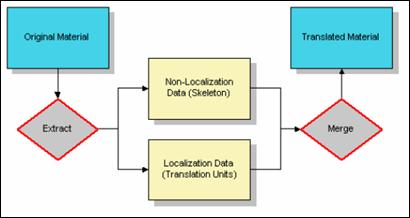
Figure 4.
XLIFF concept. (OASIS, 2003a)
The localization-related data is stored in translation units, while the codes that are not related to localization are kept in the skeleton file. The translation units and the skeleton file have place holders for the contents that were extracted from them and placed in the other. How do you separate the file? It could be done manually, converted by a generic parser, or handled by the many XLIFF tools available.
As the skeleton file is not processed and can be left alone until the translation units are ready to be merged back, the following discussions will focus on the translation units.
4.4) Translation Units
Translation units contain two elements: <source> element and <target> element. <source> contains the original text that needs to be translated; and <target> contains the corresponding translations. Once the translatable text is extracted, a segmentation process breaks down the blocks of text into smaller pieces. Keeping the translation units as small as possible maximizes the possibility of finding usable translations in the translation memory database. The contents within <target> may change as the translation process takes place. For example, translation memory may provide the first version of translations; the translations may than be reviewed and modified by human translators.
As there is always only one source language and one target language, XLIFF is essentially a one-to-one, bilingual tool. However, alternative translations may be provided using the optional and unlimited <alt-trans> element, allowing it to actually be one-to-many, multilingual.
Here is an example of the translation unit:
<trans-unit id=’1’>
<source xml:lang=’en’>What a nice day today!</source>
<target xml:lang=’zh-TW’> 今天天氣實在好!</target>
<alt-trans>
<target xml:lang=’zh-CN’>今天天气实在好!</target>
</alt-trans>
</trans-unit>
<source> and <target> comes with a list of attributes besides language to describe the content and how to handle it.
For example, even in the translation units, there will still be codes (such as font definitions or link information) embedded within the translation text. These inline codes can be represented either by an encapsulation mechanism (<bpt> as “begin paired-tag”, <ept> as “end paired-tag”, and <it> “isolated tag”) or extracted to the skeleton file and be replaced by a placeholder (<ph>).
Non-textual components, such as images, can be included in an XLIFF document and placed within a <bin-unit> element, or be treated like a skeleton file and set as an external reference.
Example – referencing to an external file:
<bin-unit
id='1' resname='IDC_POINTER_COPY' mime-type='image/cursor' restype='cursor'>
<bin-source> <external-file
href='arrowcop.cur'/> </bin-source>
</bin-unit>
Example – Embedding the file within the translation units:
<bin-unit
id='1' resname='IDC_POINTER_COPY' mime-type='image/cursor' restype='cursor'>
<bin-source> <internal-file form='base64'>
AAACAAEAICAAAAEAAQAwAQAAFgAAACgAAAAgAAAAQAAAAAEAAQAAAAAAgAAAAAAAAAAAAAAA
AAAAAAAAAAAAAAAA////AAAAAAAAAAAAAAAAAAAAAAAAAAAAAAAAAAAAAAAAAAAAAAAAAAAA
AAAAAAAAAAAAAAAAAAAAAAAAAMAAAADAAAABgAAAAYAAAAMAAAAjAAAANgAAAD4AAAA/wAAA
P4AAAD8AAAA+CAAAPBQAADg2AAAwQQAAIDYAAAAUAAAACAAA////////////////////////
//////////////////////////////////////////////8////+H////h////w///+8P///
mH///4h///+A////gA///4Af//+AP///gH///4D3//+B4///g8H//4eA//+Pwf//n+P////3 //8=
</internal-file>
</bin-source>
</bin-unit>
The elements are further equipped with different attributes to help developers and translators keep track of the changes done to the data through the localization process. For example, the <target> element can be defined with “phase-name” attribute. The attribute refers to the phase of the process that is defined in the header of the file.
For example:
<header>
<phase-group>
<phase
phase-name='trans' process-name='translation' tool='BabelEditor'
contact-email='marie-charlotte@trad_boutique.com' date='2002-10-01T23:32:23Z'/>
<phase
phase-name='edit' process-name='edit' tool='Borneo'
contact-email='roland@roncevaux-traduction.com' date='2002-10-02T14:20:03Z'/>
</phase-group>
</header>
<body>
...
<trans-unit
id='1'>
<source xml:lang='en'>.</source>
<target xml:lang='fr'>Le texte à
traduire.</target>
<alt-trans>
<target xml:lang='fr' phase-name='trans'>Le texte a
traduire</target> </alt-trans>
<alt-trans>
<target xml:lang='fr' phase-name='edit'>Le texte à
traduire.</target> </alt-trans>
</trans-unit>
</body>
The attributes could also be used to carry formatting data from different sources, and consolidate the information of the same nature together under one roof.
Example:
<trans-unit
xml:space=’preserve’ id=’1001’ maxwidth=’10’ minwidth=’10’ size-unit=’char’>
<source xml:lang=’en’> Title:
</source>
<target xml:lang=’zh-tw> 書名: </source>
</trans-unit>
Because XLIFF is a standard exchange format for localization, tools that interpret the XLIFF files would understand not only the content, but also the metadata, notes, etc.
The examples here only show a part of the tools provided by XLIFF. There are other handy tools offered, such as <prop-group> (property group), <resname> (application resource identifier), and <note> (of instructions etc.). The use of these elements are shown in the following examples:
Example1 - <prop-group>:
<?xml
version="1.0" ?>
<!DOCTYPE xliff PUBLIC
"-//XLIFF//DTD XLIFF//EN"
"http://www.oasis-open.org/committees/xliff/documents/xliff.dtd"
>
<xliff
version="1.0">
<file
source-language="en-US" datatype="HTML"
original="heroes.html" target-language="fr-FR">
<header><skl><external-file
href="skeleton.skl" /></skl></header>
<body>
<trans-unit
id="a1">
<source>iForce
Initiative</source>
<count-group
name="word count">
<count
count-type="word count" unit="word">2</count>
</count-group>
<alt-trans
tool="Sun Trans" match-quality="100">
<source>iForce
Initiative</source>
<target
xml:lang="fr-FR">Initiative iForce</target>
<prop-group
name="format penalty">
<prop
prop-type="format-diff-penalty">0</prop>
</prop-group>
</alt-trans>
</trans-unit>
</body>
</file>
</xliff>
Example2 - <resname> and <note>
<trans-unit
id="104" resname="File104">
<source>Save</source>
<target>Sauvegarder</target>
</trans-unit>
<trans-unit
id="105" resname="File105" translate="no">
<source>Save As</source>
<target>Save As</target>
<note from="Joe"
priority="High">Needed for documentation </note>
</trans-unit>
For a more complete list of elements and attributes, please refer to the whitepaper by OASIS (OASIS, 2003a), and to XLIFF 1.1 Specification (OASIS, 2003b).
Resources
XLIFF Tools
ENLASO Corp. Rainbow 4. http://xliff-tools.freedesktop.org/wiki/Resources
This is a free Windows application that helps with the localization process.
Heartsome Holdings Ltd. http://www.heartsome.net.
The company offers XLIFF translation Editor, Dictionary Editor, Translation Suite, etc. The products may not be free, but there is a one month free trail period.
Java.net Open Language Tools. https://open-language-tools.dev.java.net/.
Open-source, XLIFF Translation Editor and XLIFF Filter can be downloaded here. The software handles document types such as: HTML, SGML, JSP, XML, text files etc. It also handles software file types: PO (gettext), Msg/tmsg, Java properties, Java ResourceBundle, and Mozilla DTD resource files.
XLIFF Tools. http://xliff-tools.freedesktop.org/
This site offers a collection of XLIFF related resources, including tools, articles, blogs, and sites to download software.
Relative Readings
Corrigan, J. and Foster, T. (n.d). XLIFF: An aid to localization. Retrieved April 6, 2006 from Sun Developer Network (SDN) Web Site: http://developers.sun.com/dev/gadc/technicalpublications/articles/xliff.html.
OASIS (2003a). XLIFF1.1: A white paper on version 1.1 of the XML Localisation Interchange File Format (XLIFF). Retrieved April 5, 2006, from http://www.oasis-open.org/apps/group_public/download.php/3110/XLIFF-core-whitepaper_1.1-cs.pdf
OASIS (2003b, October 31). XLIFF 1.1 Specification. Retrieved April 5, 2006, from http://www.oasis-open.org/committees/xliff/documents/cs-xliff-core-1.1-20031031.htm
OASIS XML Localisation Interchange File Format (XLIFF) TC (n.d). Retrieved April 3, 2006, from http://www.oasis-open.org/committees/tc_home.php?wg_abbrev=xliff.
OASIS XML Localisation Interchange File Formate (XLIFF) FAQ (n.d). Retrieved April 3, 2006, from http://www.oasis-open.org/committees/xliff/faq.php.
Raya, R. (2004, Oct. 22). XML in Localisation: Use XLIFF to translate documents. Retrieved April 14, 2006 from IBM developerWorks Web site, http://www-128.ibm.com/developerworks/xml/library/x-localis2/
Raya, R. (2004, Aug. 20). XML in Localisation: A practical analysis. Retrieved April 14, 2006 from IBM developerWorks Web site, http://www-128.ibm.com/developerworks/xml/library/x-localis/
Reynolds, Jewtushenko (2005). What is XLIFF and why should I use it? XML Journal, Sep. 19, 2005. Retrieved April 3, 2006, from http://xml.sys-con.com/read/121957_1.htm.